


Sondo - AI Music Video & AI MV
3.5977.00 Reviews
App Specs
- Version
- 2.2.9
- Updated On
- License
- Free
- Downloads
- 1,000,000+
- Developer
- TUNESPHERE
- Categories
- Music & Audio
- Platform
- Android
Screenshots
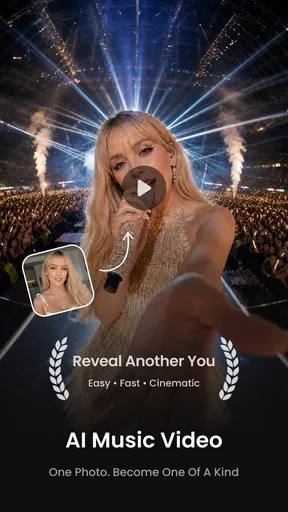
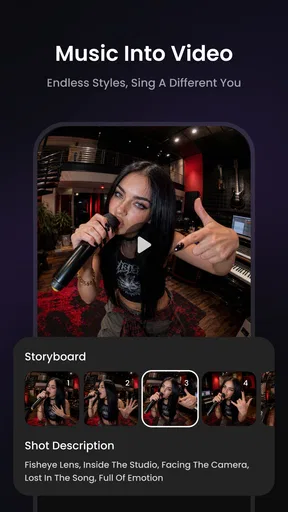
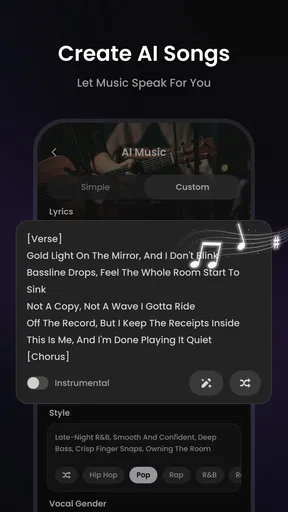
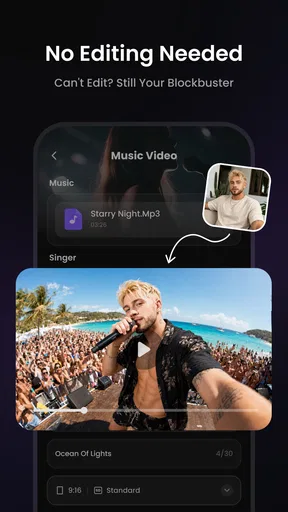
 Analysis by AppCompare
I like the appeal of making a music video without starting in a full editing suite: choose a track, get a visual treatment, and see whether the result gives the song a new mood. That is the central idea behind Sondo - AI Music Video & AI MV, a music and audio app from TUNESPHERE. Its AI-led approach is most useful when I want a quick creative draft, not when I need frame-by-frame control or a polished production workflow.
What automatic music-to-video creation changes
The important promise here is that the app can build visuals around music, rather than asking me to assemble every shot and cut myself. That changes the starting point: instead of facing a blank timeline, I can begin with a track and judge the video as a whole. For a casual creator, that can be enough to get past the hardest part—turning an idea into something visible.
That convenience comes with a trade-off. An automated visual interpretation may follow a song’s general pulse without catching every accent or musical turn. I would treat the first result as a draft to assess, not as a finished edit that must be accepted unchanged. If the track has an irregular beat or a dramatic shift in energy, I’d listen while watching and check whether the visuals support those moments rather than simply moving along with the overall rhythm.
A practical way to judge the result
When I’m choosing a track, I’d first decide what the video needs to do. A quick visual for a social post has different demands from a clip meant to introduce a new song or represent an artist’s style. Starting with one clear purpose makes it easier to decide whether the generated imagery feels appropriate, and it stops me from spending time polishing a concept that does not fit the music.
I’d also make a short test before committing to a longer creative session. Try a track with a clear, steady pulse, then compare it with one that changes pace or mood. That small comparison tells me more about how the automatic approach suits my music than browsing effects at random. If the result feels close but not quite right, the existing option to make manual adjustments is worth using; if it still misses the song’s character, a hands-on editor may be the better next step.
Where it fits among music and video apps
Compared with a conventional mobile video editor, Sondo’s main attraction is reducing the amount of editing I have to do before seeing a music-led result. A manual editor is usually the stronger choice when I need precise timing, a specific shot order, detailed titles, or a consistent visual identity across a campaign. Sondo makes more sense when speed and experimentation matter more than exact control.
It also serves a different purpose from a music player or a standard audio-production app. Those tools focus on listening to or shaping sound; this one is for pairing music with a visual presentation. I would not choose it to mix a track or to replace an editor for a carefully planned film. I would consider it when I already have music and want a visual direction to share, test, or build on.
Worth Reading Before You Choose

Flipboard Shows What News Apps Must Do Beyond the Feed

Switching to Android Auto Means Rethinking Your Driving Routine

Google Calendar Makes a Crowded Week Easier to Manage

Ludo King Makes the Most of the Minutes Between Plans

Baby Panda World Brings Quick Play to Modern Phones, but Its Game Library Feels Busy

ESPN’s Live Game View Makes Following Close Games Easier
Who gets the most from it—and who may not
The app is a natural fit for musicians who want to explore visual ideas around their work, as well as people who enjoy making short creative pieces without learning a complex editing system first. It can also help someone who has a song ready but no settled video concept: generated visuals give them something concrete to react to. That is a useful creative prompt, even when the first pass needs adjustment.
On the other hand, I would steer a filmmaker, professional editor, or artist with a strict visual brief toward a more controllable workflow. If every cut must land on a particular lyric, or the video has to follow a planned sequence, automation may feel limiting rather than liberating. The best reason to try this app is openness to a result that can surprise you, not an expectation that it will reproduce a detailed storyboard exactly.
Everyday use, cost, and expectations
A realistic use for me would be making a quick visual draft after finishing a track, then watching it once on my phone before deciding whether it is worth sharing or refining elsewhere. I’d keep the goal modest: see whether the imagery and pacing complement the song. If the piece is for a public-facing artist profile, I’d check the whole result carefully and consider whether the visual style feels like something I want associated with that music.
Sondo is free to install, though in-app purchases range from $4.99 to $59.99 per item, so I’d explore the free experience before paying for anything. Its Everyone age rating makes it broadly accessible, but that does not mean every generated video will suit every audience or context; I would still review a clip before sharing it. The app has a 4.3 average from around 6,000 ratings, with more than 100,000 installs, which suggests that people are giving it a try, but those figures cannot tell me whether its particular creative style will suit my own music.
Small workflow choices that improve the experience
One useful habit is to decide on the mood before choosing a look. If I want a calm, reflective clip, I can judge each visual choice against that intention instead of adding effects just because they are available. The same applies to energetic tracks: more visual activity is not automatically better if it distracts from the music. A restrained result can make the song feel more deliberate.
I would also keep an untouched version of the first result in mind while adjusting it. Comparing the original direction with a changed one helps me tell whether a tweak genuinely improves the video or merely makes it busier. For tracks with complex rhythms, I’d focus my attention on the sections where the beat changes or the arrangement opens up, since those are the moments most likely to expose a mismatch between the music and an automated visual pattern.
My recommendation
In my experience, Sondo is most compelling as a fast idea generator: it turns the question “What could this song look like?” into something I can actually review. TUNESPHERE’s app is free, sits in the music and audio category, and its current version is 2.1.3; it was released on April 30, 2025, and requires OS version 8.1 or later. I’d try it first for personal experiments or an early visual draft, then move to a conventional editor if exact timing and control become essential.
The app is not a substitute for every kind of video production, and that is precisely why I’d recommend it selectively. If you want a low-friction way to explore music-led visuals, it offers a clear starting point. If you need a repeatable professional edit with every detail fixed in advance, a manual tool is likely to serve you better. I’d give it a try when curiosity matters more than perfection, and judge the result against the song rather than the novelty of AI alone.
Getting Started with Sondo
First things first, downloading Sondo - AI Music Video & AI MV was a breeze. Available for both Android and iOS, it didn't take long before I was diving into the app's sleek interface. Upon opening it, you're greeted with a vibrant and intuitive layout that practically begs you to start creating. If you’re a beginner, no worries—the app guides you through the initial setup with ease.
Features That Shine
The app is packed with features designed to make you feel like a pro music video producer. The standout feature for me has to be the AI-driven video creation tool. It's almost like magic—simply choose your music, and the app analyzes the beat and rhythm to automatically sync visuals that match. Whether you’re into pop, rock, or hip-hop, Sondo has got you covered.
Another cool feature is the extensive library of effects and filters. From retro vibes to futuristic looks, the app offers a plethora of options to style your video just the way you want. I found myself spending hours just exploring the possibilities. It’s amazing how with a few taps, you can create something that looks like it took days to produce.
User Experience and Performance
Using the app feels incredibly smooth. The transitions between different screens are seamless, and I didn’t encounter any noticeable lags. That's definitely a win in my book because nothing kills creativity faster than a sluggish app. Plus, the app doesn’t drain your battery like some other intensive video apps do—a definite bonus if you’re on the go.
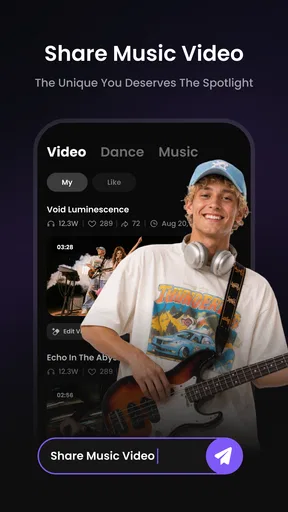
One of the things I really appreciated was the community aspect of Sondo. You can share your creations directly within the app and see what others are making. It’s a fantastic way to get inspiration and connect with fellow creators. I spent quite a bit of time scrolling through other users’ videos and was genuinely impressed by the creativity on display.
Room for Improvement
While Sondo - AI Music Video & AI MV is a fantastic tool, it’s not without its quirks. Occasionally, the AI might not sync perfectly with the music, especially if the track has complex rhythms. However, this is something I found could be manually adjusted with a few tweaks. It’s not a dealbreaker, but having a bit more control over the AI's decisions would be a welcome improvement.
Additionally, while the app is free to download, some of the more advanced features are locked behind a paywall. This is pretty standard for apps these days, but it's something to keep in mind if you’re looking to access all the bells and whistles.
Final Thoughts
All in all, Sondo is an impressive app that delivers on its promise of making music video creation accessible to everyone. Whether you’re a budding artist looking to promote your music or someone who just loves creating, this app is definitely worth checking out. The ease of use combined with powerful features makes it a must-have tool for any creative enthusiast.
So, if you’re ready to unleash your inner director and create stunning music videos right from your phone, give Sondo a try. Who knows, your next video might just go viral!
Pros
- User-friendly interface for quick navigation.
- Wide range of music genres available.
- AI-generated videos are high quality.
- Regular updates with new features.
- No intrusive ads during use.
Cons
- Limited free content options.
- Occasional lag in video rendering.
- Requires strong internet connection.
- Some features locked behind paywall.
- Limited editing tools for customization.
FAQs for Sondo - AI Music Video & AI MV
What is Sondo - AI Music Video & AI MV?
Sondo is an innovative app designed to transform your music experience by creating AI-generated music videos. It combines state-of-the-art artificial intelligence with your favorite tracks to produce visually stunning and personalized music videos. Whether you’re an artist or a fan, Sondo offers a creative platform to enhance your musical journey.
How does Sondo - AI Music Video & AI MV work?
Sondo uses advanced AI algorithms to analyze the audio data from your music and generate corresponding visual elements that sync with the rhythm and mood of the track. Users can upload their own music or select from a library, and the app will create a unique video tailored to the sound and style of the song.
Is Sondo - AI Music Video & AI MV free to use?
Sondo offers a free version with basic features, allowing users to create music videos with limited customization. For access to premium features, such as higher-resolution video exports and additional visual effects, a subscription or one-time purchase may be required. Check the app store listing for the latest pricing details.
What devices are compatible with Sondo - AI Music Video & AI MV?
Sondo is available for both Android and iOS devices. It is optimized to work on most modern smartphones and tablets. However, for the best experience, it is recommended to use the app on devices with up-to-date operating systems and sufficient processing power to handle AI computations efficiently.
Can I share the music videos created with Sondo?
Yes, Sondo allows you to easily share your AI-generated music videos on various social media platforms or send them directly to friends and family. The app provides multiple export options, making it convenient to showcase your creative work in high quality across different channels.


